
Frequently asked questions
Real questions from manufacturers looking to scale smarter:
Contact SalesDo we need full automation before using ODIN Workstation?
No. ODIN Workstation is designed for manual and semi-manual assembly lines. You can begin with digital guidance, basic traceability, and data capture, then add automation later if required.
Can ODIN Workstation be added to an existing assembly line?
Yes. It is designed to integrate into existing lines with minimal disruption and without reworking your current layout.
Can we start small and scale later?
Yes. Many customers start with a single station pilot. Scaling across the line becomes a configuration step, not a new implementation.
What does our line need to get started?
At minimum, a way to identify each product, typically a barcode or RFID. From there, devices and integrations can be added over time.
Is ODIN Workstation suitable for low-volume or high-mix production?
Yes. It is especially effective in high-mix, variant-driven environments where consistency is critical.
Is ODIN Workstation only for automotive manufacturers?
No. While widely used in automotive, it is also used in industrial equipment, engineered products, and complex manual assembly environments.
How long does it take to see value after installation?
Most customers see measurable improvements within weeks of going live on the first station.
How does ODIN Workstation improve training and reduce errors?
The built-in Digital Training Dojo turns onboarding into a measurable process. Operators learn through guided digital steps, while their performance is automatically tracked. Training that used to take weeks can be reduced to days, and every operator reaches the same consistent standard.
Is ODIN Workstation difficult for operators to use?
No. The interface is simple, visual, and task-focused. Operators see only what they need to complete the current step.
Do operators need computer skills to use the system?
No. If an operator can follow on-screen instructions and scan a barcode, they can use ODIN Workstation.
Will ODIN Workstation slow production down?
No. It typically increases throughput by preventing mistakes, reducing rework, and eliminating uncertainty.
Can multiple operators work on the same product?
Yes. Multiple operators can work in parallel on the same assembly, each with their own guided instructions.
Can operators work in their own language?
Yes. Additional languages can be supported to ensure clear guidance for multilingual teams.
Can we train operators before production starts?
Yes. Operators can be trained in the Digital Training Dojo before going live, ensuring a smooth ramp-up.
Can ODIN Workstation help us pass audits?
Yes. Every action, result, and operator ID is recorded automatically, creating an instant audit trail.
How does ODIN Workstation prevent quality issues?
It enforces correct processes in real time. Incorrect parts, missing steps, or out-of-tolerance results stop the process immediately.
Is full traceability available for every product?
Yes. Each product has a complete digital history covering assembly steps, measurements, deviations, and rework.
Can ODIN Workstation generate compliance reports?
Yes. Reports can be viewed, downloaded, or shared in formats suitable for audits and customer requirements.
How are deviations and rework handled?
Deviations are controlled by user roles, logged automatically, and fully traceable to the responsible person.
Does ODIN Workstation reduce rework and scrap?
Yes. Customers typically see a significant reduction by catching issues early rather than at end-of-line inspection.
Can ODIN Workstation support certificates of conformity?
Yes. End-of-line checks can trigger automatic certificate generation when all requirements are met.
Can we use ODIN Insights without ODIN Workstation?
No. Insights relies on structured data captured by Workstation to produce reliable analytics.
How does ODIN Workstation differ from an MES system?
MES records what happened. ODIN Workstation controls what happens, in real time, at the station level.
Does ODIN Workstation work with PLCs and vision systems?
Yes. It integrates with PLCs, vision systems like ODIN Phantom, and a wide range of industrial devices.
What equipment can ODIN Workstation connect to?
Torque tools, presses, gauges, scanners, RFID, printers, testers, and more. Additional devices can be added as needed.
Is ODIN Workstation a no-code system?
Yes. Sequences, variants, and station flows are configured using a web interface without writing code.
Can changes be made without stopping production?
In most cases, yes. Updates can be deployed quickly with minimal or no downtime.
Is data stored securely?
Yes. Access is role-based, and all changes are logged and traceable.
What results can we expect from ODIN Workstation?
Typical outcomes include faster training, higher throughput, reduced errors, and instant traceability.
Are these results proven in real factories?
Yes. Customers consistently report measurable improvements from the first station onward.
Can ODIN Workstation grow with our business?
Yes. You can start with one station and scale across lines, plants, or regions over time.
Is ODIN Workstation suitable for continuous improvement programmes?
Yes. It provides the data and control needed to support lean, quality, and CI initiatives.
Can we see ODIN Workstation in action before committing?
Yes. You can book a demo, view videos, or visit the facility to see live stations in operation.
How do we get started?
You can begin with a discovery call to discuss your current process and challenges. We will help you identify where digital work instructions, operator guidance, and real-time data can make the biggest impact. Start small, measure results, and scale when ready.
What support is available after go-live?
Implementation, commissioning, and ongoing support are available based on your needs and region.




















Unlock factory efficiency
Track every component, guide operators in real time, manage variants, and capture full production data — all in one digital workstation, powered by AI.
Get started!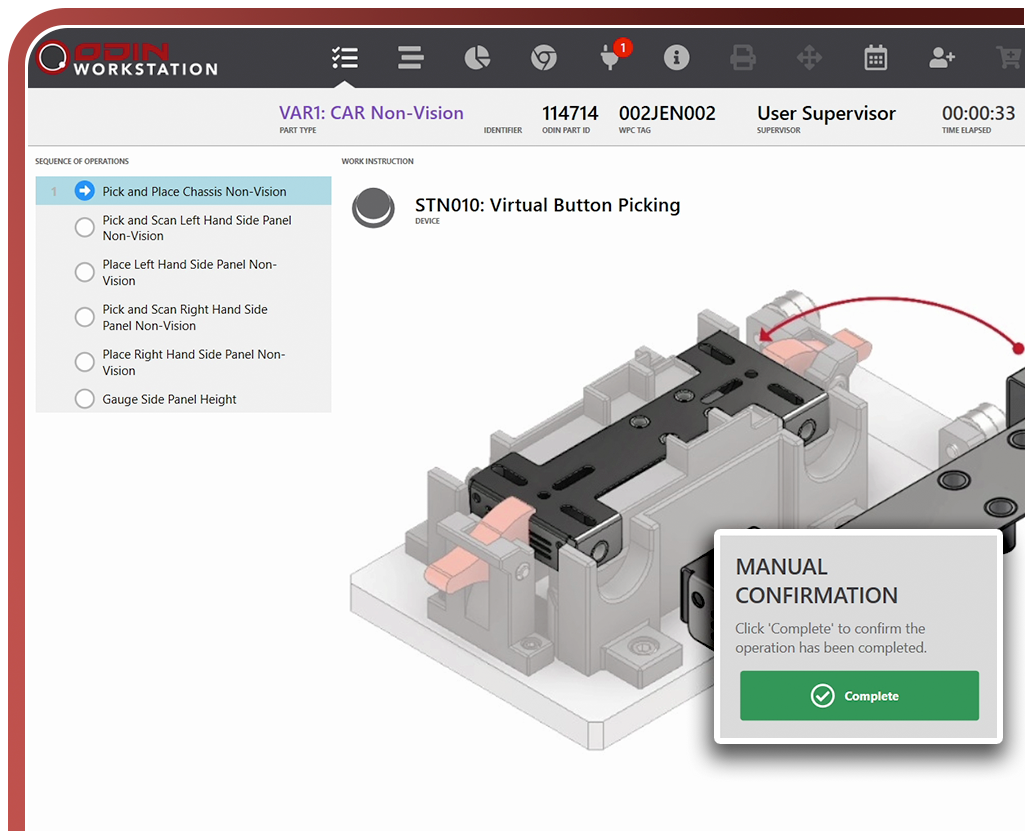
Developed by manufacturers for manufacturers
ODIN Workstation is developed by Jendamark, a leader in automation that understands the practical challenges of a production environment.
Learn More About Us